
Wednesday, February 5, 2014


Tuesday, February 4, 2014

Day 2 Dice and Computers
So day 2 we were working on understanding better both the low to high and high to low poly workflows, starting with a die, and then moving on to a more complex object that we could select from a list, of which I chose a computer tower.
So first the low to high poly version of the die:


Not too pleased with the texture (it was an experiment) and as you can probably see I'm still trying to work out this workflow.
Still working on the High poly Computer tower, here is the current work in progress:

I was going to do some more modeling tonight maybe try out one of the other objects but I'm in a bit of a weird mood so I'm going to do some painting in art rage instead :)
So first the low to high poly version of the die:
And then High to Low
Not too pleased with the texture (it was an experiment) and as you can probably see I'm still trying to work out this workflow.
Still working on the High poly Computer tower, here is the current work in progress:
I was going to do some more modeling tonight maybe try out one of the other objects but I'm in a bit of a weird mood so I'm going to do some painting in art rage instead :)
Day 1 Homework
So continued to work on coins when I had a chance this evening, and decided to see how much of the Australian coins I could get through tonight, which is they are modeled (would of like to have modeled the ridge/rim of the coins but trying to stick to the 80 poly limit given) and about half unwrapped, here is the current progress (I added some materials so they're a little clearer):

Not sure exactly what we will be working on in class tomorrow, so I'll probably work on these more later in the week.
Continuing with the Ctrl+Paint Series I went through the sketching with line section, and for homework I decided on a 10 minute animal drawing from http://artists.pixelovely.com/practice-tools/animal-drawing/
and here is what I ended up with:
 Certainly ran out of time in the end to complete it, but will continue this exercise over the next few days as time permits. What I have learnt from this so far is that it certainly would be good to up the resolution for the final black line as the brush was getting too small, and that the final line will take longer than the time limit would allow. Either shortening the time and just concentrating on the gestural line work for the time period or keeping it about ten minutes and use the full time on the gestural and first refinement pass, then work the final line pass without a time limit.
Not sure exactly what we will be working on in class tomorrow, so I'll probably work on these more later in the week.
Continuing with the Ctrl+Paint Series I went through the sketching with line section, and for homework I decided on a 10 minute animal drawing from http://artists.pixelovely.com/practice-tools/animal-drawing/
and here is what I ended up with:
Monday, February 3, 2014
Day 1 Coins
So Today's task was to model a coin, here is what I did:
Heads:
 Tails:

And in the Unity Game Engine:
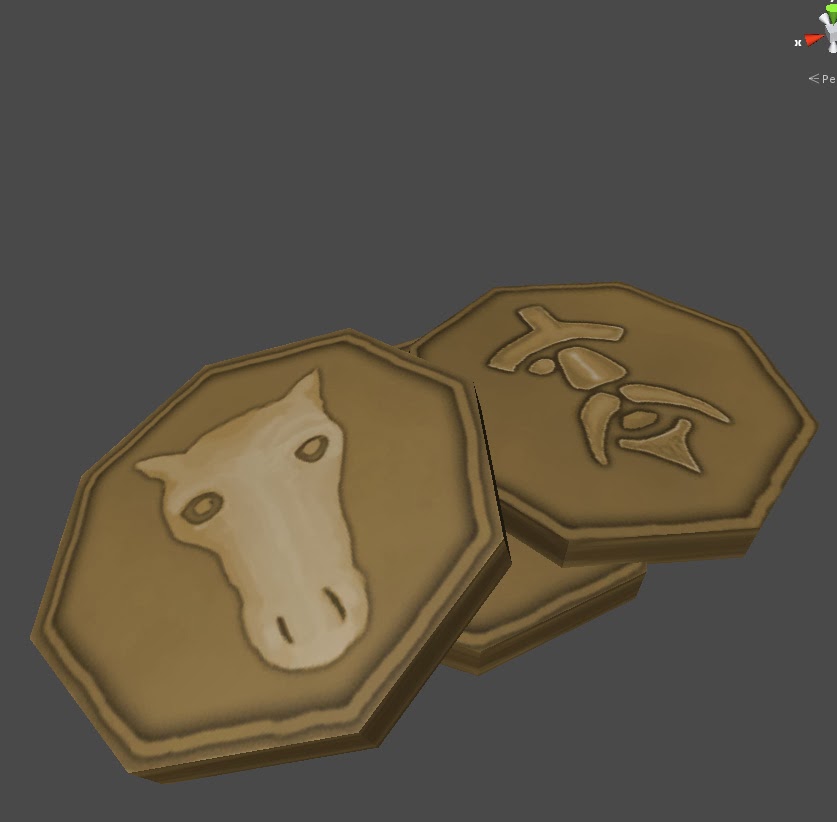
Heads:
And in the Unity Game Engine:
Sunday, February 2, 2014
Catch Up and Back to School Tomorrow! (Long Post)
Been a while since posting, for some reason when I have to scan something in, I put it off, so posting should become more regular once I get back to working digitally, which as I start back at AIE tomorrow will probably be quite soon. Ideally I'd like to be posting progress daily and we will see how that goes.
So after completing the 100 still lifes, I watched through the CTRL Paint video library through the complete unplugged section, and few of the videos relate to film studies where you work of a still image from a movie, whether off a screen shot, or by pausing, so I have been doing a little of this:
From Spiderman:
 More of these to follow (from Dr Who primarily).
Now over the past few months my partner Selina has gotten into Sugar Skulls, and as I wanted to practice skulls and thought these stylised versions would be fun, I tried it out:

And a large version for Selina to colour:

I experimented with constructed forms:

 And did quick sketches while watching old episodes of Dr Who (Series 12,13, Fourth Doctor Tom Baker, and Series 19,20 Fifth Doctor Peter Davidson)


I'd recommend the stories: Genesis of the Daleks, The Brain of Morbius, The Seeds of Doom (currently watching), Earthshock, Snakedance (with a very young Martin Clunes), and Terminus (what I'm currently watching)
I then did some sketching of the planes of the face:

And back to Doctor Who:


and practiced basic headshapes and 3D form:


And back to Doctor Who:

 That's the last bit of Doctor who for this post ;)
I then thought that I should of been taking notes from the CTRL Paint videos and so decided to start again from the start and really make sure I start to integrate these core foundations. I will skip posting the homework from the first intro to photoshop videos (Basic navigation drill, Brush drills, Swatches, and Colour temp Worksheet) and will just post from the traditional drawing section (That I'm still working through).
The video Pencils and Erasers introduced the concept of underdrawing, and the homework was to draw 20 phones:


The last one was definately fun to draw :)
The next one "The Pencil" was about using the elbow and shoulder rather than the fingers and wrist to draw, and the homework was drawing 5 pages of ovals, which I see no reason to post.
After that was visual measuring and more phones (another 20) and in case your thinking "this is worse than the above" it was more about doing measuring the angles than adding detail.

And then back to where I started on these ctrl paint series, drawing spoons

Contour line drawing:

Linear Block in:

Negative Space:

Constructive Form:

and that brings us to where I am currently Simple Still Life:


And so tomorrow I start the second and final year of my course, I'm really interested and excited to find out what we'll be working on first, and will probably post during the day some time tomorrow, and then I'll be continuing on the Drawing 2 Section of CTRL Paint :)
So after completing the 100 still lifes, I watched through the CTRL Paint video library through the complete unplugged section, and few of the videos relate to film studies where you work of a still image from a movie, whether off a screen shot, or by pausing, so I have been doing a little of this:
From Spiderman:
Now over the past few months my partner Selina has gotten into Sugar Skulls, and as I wanted to practice skulls and thought these stylised versions would be fun, I tried it out:
And a large version for Selina to colour:
I'd recommend the stories: Genesis of the Daleks, The Brain of Morbius, The Seeds of Doom (currently watching), Earthshock, Snakedance (with a very young Martin Clunes), and Terminus (what I'm currently watching)
I then did some sketching of the planes of the face:
And back to Doctor Who:
and practiced basic headshapes and 3D form:
And back to Doctor Who:
I then thought that I should of been taking notes from the CTRL Paint videos and so decided to start again from the start and really make sure I start to integrate these core foundations. I will skip posting the homework from the first intro to photoshop videos (Basic navigation drill, Brush drills, Swatches, and Colour temp Worksheet) and will just post from the traditional drawing section (That I'm still working through).
The video Pencils and Erasers introduced the concept of underdrawing, and the homework was to draw 20 phones:
The last one was definately fun to draw :)
The next one "The Pencil" was about using the elbow and shoulder rather than the fingers and wrist to draw, and the homework was drawing 5 pages of ovals, which I see no reason to post.
After that was visual measuring and more phones (another 20) and in case your thinking "this is worse than the above" it was more about doing measuring the angles than adding detail.
And then back to where I started on these ctrl paint series, drawing spoons
Contour line drawing:
Linear Block in:
Negative Space:
Constructive Form:
and that brings us to where I am currently Simple Still Life:
And so tomorrow I start the second and final year of my course, I'm really interested and excited to find out what we'll be working on first, and will probably post during the day some time tomorrow, and then I'll be continuing on the Drawing 2 Section of CTRL Paint :)
Subscribe to:
Posts (Atom)